
前端進階-ES6函式
箭頭函式
將函式轉換為箭頭函式
const upperizedNames = ['Farrin', 'Kagure', 'Asser'].map(function(name) {
  return name.toUpperCase();
});
將現有的"普通"函式轉換為箭頭函式只需幾步:
- 刪掉關鍵字
function - 刪掉圓括號
- 刪掉左右花括號
- 刪掉關鍵字
return - 刪掉分號
- 在引數列表和函式主體之間新增一個箭頭(
=>)
const upperizedNames = ['Farrin', 'Kagure', 'Asser'].map(name => name.toUpperCase());
使用箭頭函式
普通函式可以是函式宣告或函式表示式,但是箭頭函式始終是表示式。實際上,它們的全稱是“箭頭函式表示式”
- 儲存在變數中
- 當做引數傳遞給函式
- 儲存在物件的屬性中
const greet = name => `Hello ${name}!`;
greet('Asser');
//  Hello Asser!
引數列表出現在箭頭函式的箭頭(即 =>)前面。如果列表中只有一個引數,那麼可以像上述示例那樣編寫程式碼。但是,如果列表中有兩個或多個引數,或者有零個,則需要將引數列表放在圓括號內:
// 空引數列表需要括號
const sayHi = () => console.log('Hello Udacity Student!');
sayHi();
// Hello Udacity Student!

// 多個引數需要括號
const orderIceCream = (flavor, cone) => console.log(`Here's your ${flavor} ice cream in a ${cone} cone.`);
orderIceCream('chocolate', 'waffle');
// Here's your chocolate ice cream in a waffle cone.
簡寫主體語法
- 在函式主體周圍沒有花括號
- 自動返回表示式
const upperizedNames = ['Farrin', 'Kagure', 'Asser'].map(
  name => name.toUpperCase()
);
常規主體語法
- 它將函式主體放在花括號內
- 需要使用
return語句來返回內容
const upperizedNames = ['Farrin', 'Kagure', 'Asser'].map( name => {
  name = name.toUpperCase();
  return `${name} has ${name.length} characters in their name`;
});
箭頭函式很強大!
- 語法簡短多了
- 更容易編寫和閱讀的簡短單行函式
- 使用簡寫主體語法時,自動返回內容
“this” 和箭頭函式
對於普通函式,this 的值基於函式如何被呼叫。對於箭頭函式,this 的值基於函數週圍的上下文。換句話說,箭頭函式內的,this 的值與函式外面的 this 的值一樣。
普通函式
// 建構函式
function IceCream() {
  this.scoops = 0;
}

// 為 IceCream 新增 addScoop 方法
IceCream.prototype.addScoop = function() {
  setTimeout(function() {
    this.scoops++;
    console.log('scoop added!');
  }, 500);
};

const dessert = new IceCream();
dessert.addScoop(); // scoop added!
console.log(dessert.scoops); // 0
console.log(scoops); // NaN
傳遞給 setTimeout() 的函式被呼叫時沒用到 new、call() 或 apply(),也沒用到上下文物件。意味著函式內的 this 的值是全域性物件,不是 dessert 物件。實際上發生的情況是,建立了新的 scoops 變數(預設值為 undefined),然後遞增(undefined + 1 結果為 NaN)。
使用閉包
// 建構函式
function IceCream() {
  this.scoops = 0;
}

// 為 IceCream 新增 addScoop 方法
IceCream.prototype.addScoop = function() {
  const cone = this; // 設定 `this` 給 `cone`變數
  setTimeout(function() {
    cone.scoops++; // 引用`cone`變數
    console.log('scoop added!');
  }, 0.5);
};

const dessert = new IceCream();
dessert.addScoop();
console.log(dessert.scoops); // 1
上述程式碼沒有在函式內使用 this,而是將 cone 變數設為 this,然後當函式被呼叫時查詢 cone 變數。這樣可行,因為使用了函式外面的 this 值。
將傳遞給 setTimeout() 的函式替換為箭頭函式:
// 建構函式
function IceCream() {
  this.scoops = 0;
}

// 為 IceCream 新增 addScoop 方法
IceCream.prototype.addScoop = function() {
  setTimeout(() => { // 一個箭頭函式被傳遞給setTimeout
    this.scoops++;
    console.log('scoop added!');
  }, 0.5);
};

const dessert = new IceCream();
dessert.addScoop();
console.log(dessert.scoops); // 1
因為箭頭函式從周圍上下文繼承了 this 值,所以這段程式碼可行!當 addScoop() 被呼叫時,addScoop() 中的 this 的值指的是 dessert。因為箭頭函式被傳遞給 setTimeout(),它使用周圍上下文判斷它裡面的 this 指的是什麼。因為箭頭函式外面的 this 指的是 dessert,所以箭頭函式裡面的 this 的值也將是 dessert。
如果我們將 addScoop() 方法改為箭頭函式,你認為會發生什麼?
// 建構函式
function IceCream() {
    this.scoops = 0;
}

// 為 IceCream 新增 addScoop 方法
IceCream.prototype.addScoop = () => { // addScoop 現在是一個箭頭函式
  setTimeout(() => {
    this.scoops++;
    console.log('scoop added!');
  }, 0.5);
};

const dessert = new IceCream();
dessert.addScoop();
console.log(dessert.scoops); // 0
在 addScoop() 方法外面,this 的值是全域性物件。因此如果 addScoop() 是箭頭函式,addScoop() 中的 this 的值是全域性物件。這樣的話,傳遞給 setTimeout() 的函式中的 this 的值也設為了該全域性物件!
預設函式引數
function greet(name = 'Student', greeting = 'Welcome') {
  return `${greeting} ${name}!`;
}

greet(); // Welcome Student!
greet('James'); // Welcome James!
greet('Richard', 'Howdy'); // Howdy Richard!
要建立預設引數,需要新增等號 ( = ) 以及當引數未提供時引數應該設為的預設值。在上述程式碼中,兩個引數的預設值都是字串,但是可以為任何 JavaScript 資料型別!
預設值和解構
預設值和解構陣列
function createGrid([width = 5, height = 5]) {
  return `Generates a ${width} x ${height} grid`;
}

createGrid([]); // Generates a 5 x 5 grid
createGrid([2]); // Generates a 2 x 5 grid
createGrid([2, 3]); // Generates a 2 x 3 grid
createGrid([undefined, 3]); // Generates a 5 x 3 grid
createGrid() 函式預期傳入的是陣列。它通過解構將陣列中的第一項設為 width,第二項設為 height。如果陣列為空,或者只有一項,那麼就會使用預設引數,並將缺失的引數設為預設值 5。
createGrid(); // throws an error
// Uncaught TypeError: Cannot read property 'Symbol(Symbol.iterator)' of undefined
出現錯誤,因為 createGrid() 預期傳入的是陣列,然後對其進行解構。因為函式被呼叫時沒有傳入陣列,所以出現問題。但是,我們可以使用預設的函式引數!
function createGrid([width = 5, height = 5] = []) {
  return `Generating a grid of ${width} by ${height}`;
}
createGrid(); // Generates a 5 x 5 grid
預設值和解構物件
function createSundae({scoops = 1, toppings = ['Hot Fudge']}) {
  const scoopText = scoops === 1 ? 'scoop' : 'scoops';
  return `Your sundae has ${scoops} ${scoopText} with ${toppings.join(' and ')} toppings.`;
}

createSundae({}); // Your sundae has 1 scoop with Hot Fudge toppings.
createSundae({scoops: 2}); // Your sundae has 2 scoops with Hot Fudge toppings.
createSundae({scoops: 2, toppings: ['Sprinkles']}); // Your sundae has 2 scoops with Sprinkles toppings.
createSundae({toppings: ['Cookie Dough']}); // Your sundae has 1 scoop with Cookie Dough toppings.

createSundae(); // throws an error
// Uncaught TypeError: Cannot match against 'undefined' or 'null'.
通過新增空物件作為預設引數,以防未提供引數,現在呼叫函式時沒有任何引數將可行。
function createSundae({scoops = 1, toppings = ['Hot Fudge']} = {}) {
  const scoopText = scoops === 1 ? 'scoop' : 'scoops';
  return `Your sundae has ${scoops} ${scoopText} with ${toppings.join(' and ')} toppings.`;
}
createSundae(); // Your sundae has 1 scoop with Hot Fudge toppings.
function houseDescriptor({houseColor = 'green', shutterColors = ['red']} = {}) {
  return `I have a ${houseColor} house with ${shutterColors.join(' and ')} shutters`;
}

// 下面的可以正常執行
houseDescriptor({});
houseDescriptor();
houseDescriptor({houseColor = 'red'});
houseDescriptor({shutterColors = ['orange', 'blue']});
houseDescriptor({houseColor = 'red', shutterColors = ['orange', 'blue']});
陣列預設值與物件預設值
與陣列預設值相比,物件預設值具備的一個優勢是能夠處理跳過的選項。
function createSundae({scoops = 1, toppings = ['Hot Fudge']} = {}) { … }
createSundae({toppings: ['Hot Fudge', 'Sprinkles', 'Caramel']});
使用陣列預設值進行解構的同一函式相對比:
function createSundae([scoops = 1, toppings = ['Hot Fudge']] = []) { … }
createSundae([undefined, ['Hot Fudge', 'Sprinkles', 'Caramel']]);
因為陣列是基於位置的,我們需要傳入 undefined 以跳過第一個引數(並使用預設值)來到達第二個引數。
除非你有很充足的理由來使用陣列預設值進行陣列解構,否則建議使用物件預設值進行物件解構!
類預覽
class Dessert {
  constructor(calories = 250) {
    this.calories = calories;
  }
}

class IceCream extends Dessert {
  constructor(flavor, calories, toppings = []) {
    super(calories);
    this.flavor = flavor;
    this.toppings = toppings;
  }
  addTopping(topping) {
    this.toppings.push(topping);
  }
}
classextendssuper()
對 JavaScript 類的錯覺
var cookie = new Dessert();
ECMAScript 為我們提供了一些新的關鍵字,如 class、extends 和 super 等,但是這並不意味著整個語言的運作機制發生了變化,所以 JS 核心仍然在使用函式和原型繼承,我們只是有了一種更清晰易懂的方式來實現相同的功能。語言的基本功能並沒有發生改變,所以JS 並不是一門基於類的語言。它使用函式來建立物件,並通過原型(prototype)將它們關聯在一起。JS 只是給常規函式和原型披上了一層類的外衣。
JavaScript 類
ES5 “類”總結
function Plane(numEngines) {
  this.numEngines = numEngines;
  this.enginesActive = false;
}

// 由所有例項 "繼承" 的方法
Plane.prototype.startEngines = function () {
  console.log('starting engines...');
  this.enginesActive = true;
};

const richardsPlane = new Plane(1);
richardsPlane.startEngines();

const jamesPlane = new Plane(4);
jamesPlane.startEngines();
在上述程式碼中,Plane 函式是一個建構函式,它將用來建立新的 Plane 物件。具體的 Plane 物件的資料被傳遞給 Plane 函式,並設定到該物件上。每個 Plane 物件繼承的方法被放置在 Plane.prototype 物件上。
需要注意的事項:
- 建構函式使用
new關鍵字被呼叫 - 按照慣例,建構函式名以
大寫字母開頭 - 建構函式控制將被建立的物件的資料的設定
- “
繼承”的方法被放在建構函式的原型物件上
在 ES6 類都在底層幫你設定了所有這些。
class Plane {
  constructor(numEngines) {
    this.numEngines = numEngines;
    this.enginesActive = false;
  }

  startEngines() {
    console.log('starting engines…');
    this.enginesActive = true;
  }
}
將函式轉換為類
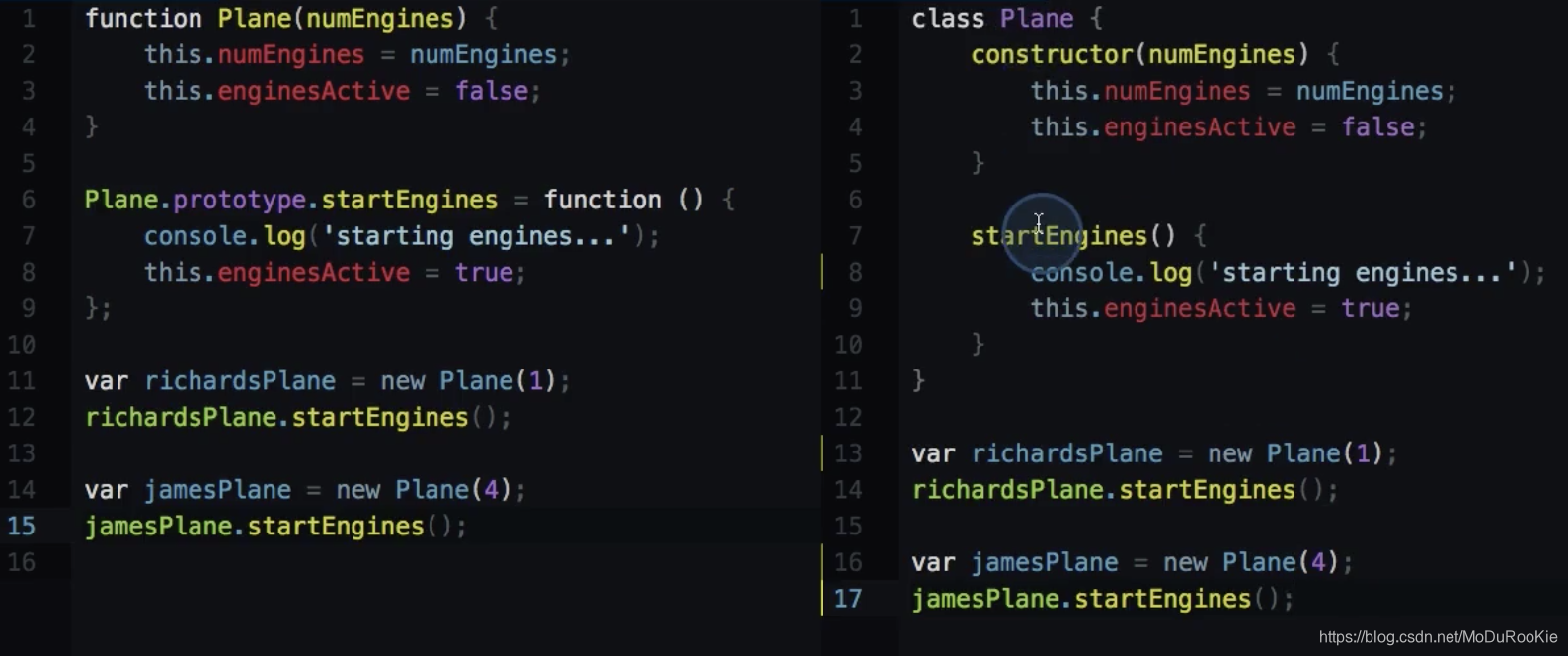
使用 JavaScript 類
類只是一種函式
class Plane {
  constructor(numEngines) {
    this.numEngines = numEngines;
    this.enginesActive = false;
  }

  startEngines() {
    console.log('starting engines…');
    this.enginesActive = true;
  }
}
typeof Plane; // function
沒錯,它只是個函式!甚至沒有向 JavaScript 新增新型別。
靜態方法
class Plane {
  constructor(numEngines) {
    this.numEngines = numEngines;
    this.enginesActive = false;
  }

  static badWeather(planes) {
    for (plane of planes) {
      plane.enginesActive = false;
    }
  }

  startEngines() {
    console.log('starting engines…');
    this.enginesActive = true;
  }
}
這樣使得 badWeather() 成為 Plane 類中可以直接訪問的方法,因此你可以這樣呼叫它:
Plane.badWeather([plane1, plane2, plane3]);
類的優勢
- 設定內容更少
- 清晰地定義了建構函式
- 全部都包含起來了
使用類時需要注意的事項
class不是魔術,關鍵字class帶來了其它基於類的語言中的很多思想觀念。它沒有像變魔術一樣向 JavaScript 類添加了此功能。class是原型繼承的抽象形式,JavaScript 類實際上使用的就是原型繼承。- 使用類需要用到
new,在建立 JavaScript 類的新例項時,必須使用關鍵字new。
ES6 中的子類
現在使用新的 super 和 extends 關鍵字擴充套件類。
class Tree {
  constructor(size = '10', leaves = {spring: 'green', summer: 'green', fall: 'orange', winter: null}) {
    this.size = size;
    this.leaves = leaves;
    this.leafColor = null;
  }

  changeSeason(season) {
    this.leafColor = this.leaves[season];
    if (season === 'spring') {
      this.size += 1;
    }
  }
}

class Maple extends Tree {
  constructor(syrupQty = 15, size, leaves) {
    super(size, leaves);
    this.syrupQty = syrupQty;
  }

  changeSeason(season) {
    super.changeSeason(season);
    if (season === 'spring') {
      this.syrupQty += 1;
    }
  }

  gatherSyrup() {
    this.syrupQty -= 3;
  }
}

const myMaple = new Maple(15, 5);
myMaple