ionic載入cordova科大訊飛語音輸入法外掛相關問題
阿新 • • 發佈:2018-12-16
1:申請相關appid,見官網,新增語音聽寫服務,下載sdk
2:下載cordova外掛,見https://github.com/Edc-zhang/cordova-plugin-IFlyspeech
3:將sdk的libs資料夾,替換cordova外掛的src/android/libs
將cordova外掛的plugin.xml、src\android\res\values\string.xml中的appid相應替換
4:cordova6 可以直接安裝 ionic cordova plugin add 路徑
cordova7需要新增plugman。安裝命令npm install -g plugman,然後 plugman createpackagejson 外掛全路徑,然後就生成package.json了
5:新建ionic專案
<?xml version='1.0' encoding='utf-8'?> <plugin id="cordova-plugin-xunfeiListenSpeaking" version="0.0.1" xmlns="http://apache.org/cordova/ns/plugins/1.0" xmlns:android="http://schemas.android.com/apk/res/android"> <name>cordova-plugin-xunfeiListenSpeaking</name> <platform name = "android"> <js-module name="xunfeiListenSpeaking" src="www/cordova-plugin-xunfeiListenSpeaking.js"> <clobbers target="xunfeiListenSpeaking" /> </js-module> <config-file target="res/xml/config.xml" parent="/*"> <featurename="XunfeiListenSpeaking" > <param name="android-package" value="com.thomas.xunfeilistenspeaking.XunfeiListenSpeaking"/> </feature> </config-file> <config-file target="AndroidManifest.xml" parent="/manifest"> <uses-permission android:name="android.permission.RECEIVE_BOOT_COMPLETED"/> <uses-permission android:name="android.permission.RECORD_AUDIO" /> <uses-permission android:name="android.permission.INTERNET" /> <uses-permission android:name="android.permission.ACCESS_NETWORK_STATE" /> <uses-permission android:name="android.permission.ACCESS_WIFI_STATE" /> <uses-permission android:name="android.permission.CHANGE_NETWORK_STATE" /> <uses-permission android:name="android.permission.READ_PHONE_STATE" /> <uses-permission android:name="android.permission.ACCESS_FINE_LOCATION" /> <uses-permission android:name="android.permission.READ_CONTACTS" /> <uses-permission android:name="android.permission.WRITE_EXTERNAL_STORAGE" /> <uses-permission android:name="android.permission.WRITE_SETTINGS" /> <uses-permission android:name="android.permission.READ_EXTERNAL_STORAGE" /> <!-- 移動統計分析 --> <meta-data android:name="IFLYTEK_APPKEY" android:value="5c0f2378" /> <meta-data android:name="IFLYTEK_CHANNEL" android:value="Android_Demo" /> </config-file> <config-file target="AndroidManifest.xml" parent="/manifest/application"> <activity android:name="com.thomas.xunfeilistenspeaking.XunfeiDialogActivity" android:theme="@android:style/Theme.Translucent.NoTitleBar"> </activity> </config-file> <!--assets--> <source-file src="src/android/assets/iattest.wav" target-dir="app/src/main/assets"/> <source-file src="src/android/assets/call.bnf" target-dir="app/src/main/assets"/> <source-file src="src/android/assets/grammar_sample.abnf" target-dir="app/src/main/assets"/> <source-file src="src/android/assets/keys" target-dir="app/src/main/assets"/> <source-file src="src/android/assets/userwords" target-dir="assets"/> <source-file src="src/android/assets/iflytek/voice_bg.9.png" target-dir="app/src/main/assets/iflytek"/> <source-file src="src/android/assets/iflytek/voice_empty.png" target-dir="app/src/main/assets/iflytek"/> <source-file src="src/android/assets/iflytek/voice_full.png" target-dir="app/src/main/assets/iflytek"/> <source-file src="src/android/assets/iflytek/waiting.png" target-dir="app/src/main/assets/iflytek"/> <source-file src="src/android/assets/iflytek/warning.png" target-dir="app/src/main/assets/iflytek"/> <source-file src="src/android/assets/iflytek/recognize.xml" target-dir="app/src/main/assets/iflytek"/> <!-- <source-file src="src/android/assets/iattest.wav" target-dir="assets"/> <source-file src="src/android/assets/call.bnf" target-dir="assets"/> <source-file src="src/android/assets/grammar_sample.abnf" target-dir="assets"/> <source-file src="src/android/assets/keys" target-dir="assets"/> <source-file src="src/android/assets/userwords" target-dir="assets"/> <source-file src="src/android/assets/iflytek/voice_bg.9.png" target-dir="assets/iflytek"/> <source-file src="src/android/assets/iflytek/voice_empty.png" target-dir="assets/iflytek"/> <source-file src="src/android/assets/iflytek/voice_full.png" target-dir="assets/iflytek"/> <source-file src="src/android/assets/iflytek/waiting.png" target-dir="assets/iflytek"/> <source-file src="src/android/assets/iflytek/warning.png" target-dir="assets/iflytek"/> <source-file src="src/android/assets/iflytek/recognize.xml" target-dir="assets/iflytek"/> --> <!--lib--> <!-- 移植到老專案 --> <!-- <lib-file src="src/android/libs/Msc.jar" target-dir="libs"/> <lib-file src="src/android/libs/Sunflower.jar" target-dir="libs"/> <source-file src="src/android/libs/armeabi/libmsc.so" target-dir="app/libs/armeabi"/> <source-file src="src/android/libs/arm64-v8a/libmsc.so" target-dir="app/libs/arm64-v8a"/> <source-file src="src/android/libs/armeabi-v7a/libmsc.so" target-dir="app/libs/armeabi-v7a"/> <source-file src="src/android/libs/mips/libmsc.so" target-dir="app/libs/mips"/> <source-file src="src/android/libs/mips64/libmsc.so" target-dir="app/libs/mips64"/> <source-file src="src/android/libs/x86/libmsc.so" target-dir="app/libs/x86"/> <source-file src="src/android/libs/x86_64/libmsc.so" target-dir="app/libs/x86_64"/> --> <!-- 新建專案 --> <lib-file src="src/android/libs/Msc.jar" target-dir="libs"/> <lib-file src="src/android/libs/Sunflower.jar" target-dir="libs"/> <source-file src="src/android/libs/armeabi/libmsc.so" target-dir="app/src/main/jniLibs/armeabi"/> <source-file src="src/android/libs/arm64-v8a/libmsc.so" target-dir="app/src/main/jniLibs/arm64-v8a"/> <source-file src="src/android/libs/armeabi-v7a/libmsc.so" target-dir="app/src/main/jniLibs/armeabi-v7a"/> <!--layout--> <source-file src="src/android/res/layout/activity_xunfei_dialog.xml" target-dir="res/layout"/> <!--xml--> <source-file src="src/android/res/xml/iat_setting.xml" target-dir="res/xml"/> <source-file src="src/android/res/xml/ise_settings.xml" target-dir="res/xml"/> <source-file src="src/android/res/xml/tts_setting.xml" target-dir="res/xml"/> <source-file src="src/android/res/xml/understand_setting.xml" target-dir="res/xml"/> <!--src--> <source-file src="src/android/src/com/thomas/xunfeilistenspeaking/XunfeiListenSpeaking.java" target-dir="src/com/thomas/xunfeilistenspeaking"/> <source-file src="src/android/src/com/thomas/xunfeilistenspeaking/IatSettings.java" target-dir="src/com/thomas/xunfeilistenspeaking"/> <source-file src="src/android/src/com/thomas/xunfeilistenspeaking/JsonParser.java" target-dir="src/com/thomas/xunfeilistenspeaking"/> <source-file src="src/android/src/com/thomas/xunfeilistenspeaking/SettingTextWatcher.java" target-dir="src/com/thomas/xunfeilistenspeaking"/> <source-file src="src/android/src/com/thomas/xunfeilistenspeaking/XunfeiDialogActivity.java" target-dir="src/com/thomas/xunfeilistenspeaking"/> <!--res--> <config-file target="res/values/strings.xml" parent="/resources"> <!--<string name="app_name">訊飛語音示例</string>--> <!-- 請替換成在語音雲官網申請的appid --> <string name="app_id">5c0f2378</string> <string name="example_explain">本示例為訊飛語音Android平臺開發者提供語音聽寫、語法識別、語義理解和語音合成等程式碼樣例,旨在讓使用者能夠依據該示例快速開發出基於語音介面的應用程式。</string> <string name="text_tts_source">科大訊飛作為中國最大的智慧語音技術提供商,在智慧語音技術領域有著長期的研究積累,並在中文語音合成、語音識別、口語評測等多項技術上擁有國際領先的成果。科大訊飛是我國唯一以語音技術為產業化方向的“國家863計劃成果產業化基地”…</string> <string name="text_tts_source_en">iFLYTEK is a national key software enterprise dedicated to the research of intelligent speech and language technologies, development of software and chip products, provision of speech information services, and integration of E-government systems. The intelligent speech technology of iFLYTEK, the core technology of the company, represents the top level in the world.</string> <string name="text_isr_abnf_hint">\t上傳內容為:\n\t#ABNF 1.0 gb2312;\n\tlanguage zh-CN;\n\tmode voice;\n\troot $main;\n\t$main = $place1 到$place2 ;\n\t$place1 = 北京 | 武漢 | 南京 | 天津 | 東京;\n\t$place2 = 上海 | 合肥;</string> <string name="text_understand_hint">\t您可以說:\n\t今天的天氣怎麼樣?\n\t北京到上海的火車?\n\t有什麼好吃的?\n\t上海外灘有哪些酒店?\n\n\t更多語義請登入:\n\thttp://osp.voicecloud.cn/ \n\t配置您的專屬語義吧!</string> <!-- 聽寫 --> <string name="text_begin">請開始說話…</string> <string name="text_begin_recognizer">開始音訊流識別</string> <string name="text_upload_contacts">上傳聯絡人</string> <string name="text_upload_userwords">上傳使用者詞表</string> <string name="text_upload_success">上傳成功</string> <string name="text_userword_empty">詞表下載失敗或內容為空</string> <string name="text_download_success">下載成功</string> <string name="pref_key_iat_show">iat_show</string> <string name="pref_title_iat_show">顯示聽寫介面</string> <string name="pref_title_iat_dwa">結果動態修正</string> <string name="xunfei_cancel_listen">取消語音</string> <!-- 合成 --> <string-array name="engine_entries"> <item>本地合成</item> <item>線上合成</item> </string-array> <string-array name="engine_values"> <item>local</item> <item>cloud</item> </string-array> <string-array name="voicer_cloud_entries"> <item>小燕—女青、中英、普通話</item> <item>小宇—男青、中英、普通話</item> <item>凱瑟琳—女青、英</item> <item>亨利—男青、英</item> <item>瑪麗—女青、英</item> <item>小研—女青、中英、普通話</item> <item>小琪—女青、中英、普通話</item> <item>小峰—男青、中英、普通話</item> <item>小梅—女青、中英、粵語</item> <item>小莉—女青、中英、臺灣普通話</item> <item>小蓉—女青、中、四川話</item> <item>小芸—女青、中、東北話</item> <item>小坤—男青、中、河南話</item> <item>小強—男青、中、湖南話</item> <item>小瑩—女青、中、陝西話</item> <item>小新—男童、中、普通話</item> <item>楠楠—女童、中、普通話</item> <item>老孫—男老、中、普通話</item> </string-array> <string-array name="voicer_cloud_values"> <item>xiaoyan</item> <item>xiaoyu</item> <item>catherine</item> <item>henry</item> <item>vimary</item> <item>vixy</item> <item>xiaoqi</item> <item>vixf</item> <item>xiaomei</item> <item>xiaolin</item> <item>xiaorong</item> <item>xiaoqian</item> <item>xiaokun</item> <item>xiaoqiang</item> <item>vixying</item> <item>xiaoxin</item> <item>nannan</item> <item>vils</item> </string-array> <string-array name="emot_entries"> <item>正常</item> <item>高興</item> <item>悲傷</item> <item>生氣</item> </string-array> <string-array name="emot_values"> <item>neutral</item> <item>happy</item> <item>sad</item> <item>angry</item> </string-array> <string-array name="stream_entries"> <item>通話</item> <item>系統</item> <item>鈴聲</item> <item>音樂</item> <item>鬧鈴</item> <item>通知</item> </string-array> <string-array name="stream_values"> <item>0</item> <item>1</item> <item>2</item> <item>3</item> <item>4</item> <item>5</item> </string-array> <string formatted="false" name="tts_toast_format">緩衝進度為%d%%,播放進度為%d%%</string> <!-- 語言 --> <string-array name="language_entries"> <item>普通話</item> <item>粵語</item> <item>河南話</item> <item>英語</item> </string-array> <string-array name="language_values"> <item>mandarin</item> <item>cantonese</item> <item>henanese</item> <item>en_us</item> </string-array> <!-- 語音評測 --> <string name="text_en_word">"[word]\napple\nbanana\norange"</string> <string name="text_en_sentence">"The quick brown fox jumps over the lazy dog."</string> <string name="text_cn_syllable">"知,痴,是"</string> <string name="text_cn_word">"磁鐵,率領,脆弱,動手,古箏"</string> <string name="text_cn_sentence">"一座座雪峰插入雲霄,峰頂銀光閃閃,大大小小的湖泊,像顆顆寶石鑲嵌在綵帶般的溝谷中。"</string> <string-array name="ise_language_entries"> <item>英語</item> <item>漢語</item> </string-array> <string-array name="ise_language_values"> <item>en_us</item> <item>zh_cn</item> </string-array> <string-array name="category_entries"> <item>單字</item> <item>詞語</item> <item>句子</item> </string-array> <string-array name="category_values"> <item>read_syllable</item> <item>read_word</item> <item>read_sentence</item> </string-array> <string-array name="result_level_entries"> <item>plain</item> <item>complete</item> </string-array> <!-- 標點符號 --> <string-array name="punc_entries"> <item>有標點</item> <item>無標點</item> </string-array> <string-array name="punc_values"> <item>1</item> <item>0</item> </string-array> <string-array name="dwa_entries"> <item>開啟</item> <item>關閉</item> </string-array> </config-file> </platform> <platform name="ios"> <js-module name="speech" src="www/Speech.js"> <!-- <clobbers target="navigator.speech" />--> <clobbers target="xunfeiListenSpeaking" /> </js-module> <config-file parent="/*" target="config.xml"> <feature name="Speech"> <param name="ios-package" value="CDVSpeech" /> </feature> </config-file> <config-file target="*-Info.plist" parent="NSMicrophoneUsageDescription"> <string></string> </config-file> <header-file src="src/ios/CDVSpeech.h" /> <source-file src="src/ios/CDVSpeech.m" /> <framework src="AVFoundation.framework" /> <framework src="AddressBook.framework" /> <framework src="AudioToolbox.framework" /> <framework src="SystemConfiguration.framework" /> <framework src="QuartzCore.framework" /> <framework src="libz.tbd" /> <framework src="libc++.tbd" /> <framework src="UIKit.framework" /> <framework src="CoreGraphics.framework" /> <framework src="Foundation.framework" /> <framework src="CoreTelephony.framework" /> <framework src="CoreLocation.framework" /> <framework src="Contacts.framework" /> <framework src="src/ios/iflyMSC.framework" custom="true" /> </platform> </plugin>
6:用法、home.ts
 1 import { Component, ChangeDetectorRef } from '@angular/core';
 2 import { NavController,ToastController } from 'ionic-angular';
 3 declare let xunfeiListenSpeaking: any;
 4
 5 @Component({
 6   selector: 'page-home',
 7   templateUrl: 'home.html'
 8 })
 9 export class HomePage {
10     public listenText: string = '';
11
12
13     constructor(public navCtrl: NavController, public toastCtrl: ToastController, public cd: ChangeDetectorRef) {
14         console.log(xunfeiListenSpeaking);
15
16   }
17
18   single(){
19     let that = this;
20       xunfeiListenSpeaking.startListen(data => {
21           if (data) {
22               //data即是返回的文字
23               that.listenText = data;
24               console.log(data);
25           } else {
26               console.log(data);
27               console.log('沒有值');
28           }
29           setTimeout(
30               function() {
31                   //事件處理
32                   that.listenText = data;
33                   console.log('結束說話');
34                   xunfeiListenSpeaking.stopListen();
35                   //that.refresh();
36                   console.log(that.listenText);
37               }, 5000)
38
39       }, err => alert(err), false, true);
40
41       console.log(that.listenText);
42
43   }
44
45    testVoice1() {
46          let that = this;
47           console.log('開始說話...');
48           const toast = this.toastCtrl.create({
49           message: '請開始說話',
50           duration: 3000
51         });
52         toast.present();
53           xunfeiListenSpeaking.startListen(data=>{
54               if (data) {
55                         //data即是返回的文字
56                         that.listenText = data;
57                         console.log(data);
58                 } else {
59                         console.log(data);
60                         console.log('沒有值');
61                 }
62           }, err=>alert(err), false, true);
63         console.log(that.listenText);
64   }
65
66   stopListen() {
67     setTimeout(
68         function() {
69             //事件處理
70             console.log('結束說話');
71             xunfeiListenSpeaking.stopListen();
72         },5000)
73   //    alert(this.listenText);
74   }
75   output(){
76         alert(this.listenText);
77   }
78
79   testVoice2() {
80       // let msg = '你好';
81       xunfeiListenSpeaking.startSpeak(data => alert(data), err => alert(err), this.listenText);
82   }
83
84 }
home.html
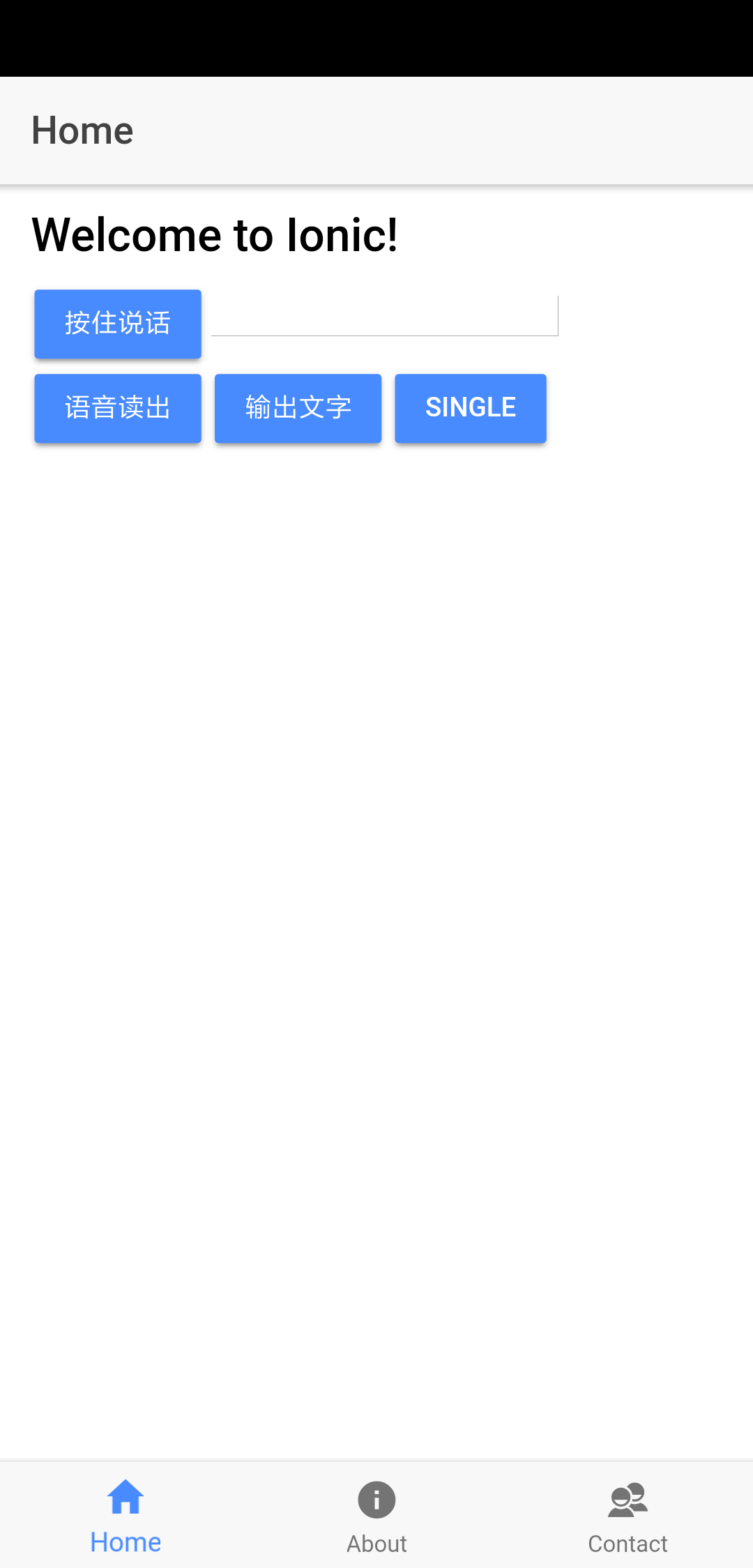
 1 <ion-header>
 2   <ion-navbar>
 3     <ion-title>Home</ion-title>
 4   </ion-navbar>
 5 </ion-header>
 6 <ion-content padding>
 7   <h2>Welcome to Ionic!</h2>
 8   <button ion-button (touchstart)="testVoice1()" (touchend)="stopListen()">按住說話</button>
 9   <input type="text" [(ngModel)]="listenText" />
10   <button ion-button (click)="testVoice2()">語音讀出</button>
11   <button ion-button (click)="output()">輸出文字</button>
12   <button ion-button (click)="single()">single</button>
13 </ion-content>
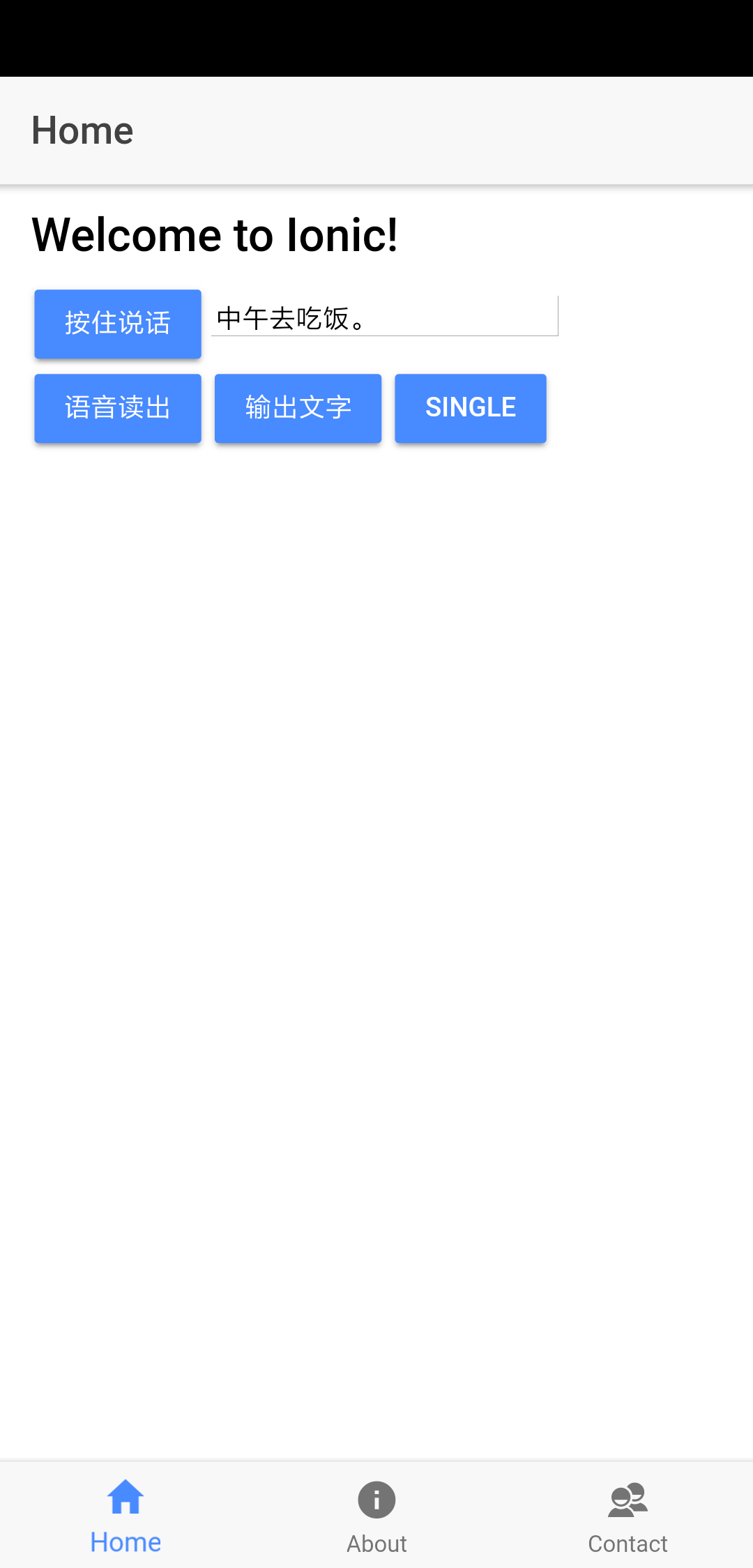
7:效果: